

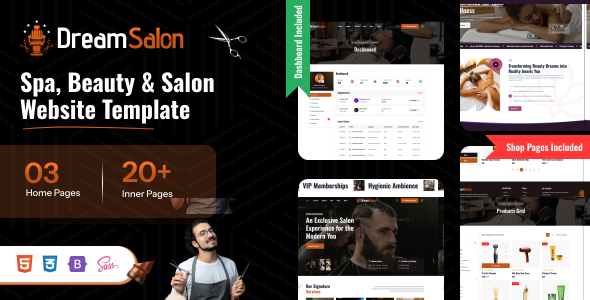
DreamSalon is a stylish, fully responsive, and feature-rich template designed specifically for beauty salons, spas, barbershops, and wellness centers. Built with Bootstrap 5.3.x, it comes with 3 elegant homepage layouts and a powerful admin panel that includes separate dashboards for customers. The template supports RTL and offers both light and dark modes for a seamless user experience across all devices. Whether you're building a salon website or a complete appointment management system, DreamSalon provides all the tools you need in one clean, modern package.

Dream Salon is a modern, fully responsive beauty salons, spas, barbershops, and wellness centers template built with Nextjs, TypeScript. It comes with 3 stunning homepage layouts and a complete set of pages for restaurants, cafes, and food delivery services.
Technical Features
- Built with React 18 & TypeScript
- Vite for Fast Development & Builds
- Redux Toolkit for State Management
- React Router with Lazy Loading
- Swiper.js for Sliders & Carousels
- Fancybox Lightbox Integration
- Responsive Design (Mobile & Tablet Friendly)
- Auth Pages (Sign In, Sign Up, Forgot Password)
Project Overview
The project follows a modular structure with clear separation of concerns.
dreamsalon/
	│
	└── nextjs/
		├── app/
		│	├── (authentication)/
		│	│	├── coming-soon/
		│	│	├── error-404/
		│	│	├── error-500/
		│	│	├── forgot-password/
		│	│	├── reset-password/
		│	│	├── sign-in/
		│	│	├── sign-up/
		│	│	├── under-maintenance/
		│	│	└── layout.tsx
		│	├── (public-page)/
		│	│	├── about-us/
		│	│	├── blog-details/
		│	│	├── blog-grid/
		│	│	├── blog-list/
		│	│	├── branches/
		│	│	|
		│	│	└── layout.tsx
		│	├── global.scss
		│	├── layout.tsx
		│	└── page.tsx
		├── components/
		│	├── bootstrap-js/
		│	├── breadcrumb/
		│	├── common-date-picker/
		│	├── common-date-range-picker/
		│	├── common-footer/
		│	├── common-lightbox/
		│	├── common-select/
		│	├── common-time-pickers/
		│	├── header/
		│	├── horizontal-slide/
		│	├── image-with-base-path/
		│	├── modals/
		│	├── preloader/
		│	├── scroll-to-top/
		│	├── swiper/
		│	├── text-editor/
		│	└── user-sidebar/
		├── config/
		│	└── metadata.ts
		├── core/
		│	├── data/
		│	├── json/
		│	└── redux/
		├── hooks/
		│	├── useAnimationTitle.ts
		│	├── useCheckoutWizard.ts
		│	├── useCounterAnimation.tsx
		│	├── useFancybox.tsx
		│	├── useFavourite.ts
		│	├── useReduxHooks.ts
		│	├── useTagInput.ts
		│	└── useThemeSettings.ts
		├── pages/
		│	├── Home/
		│	├── Home2/
		│	├── Home3/
		│	├── auth-page/
		│	│	├── forgot-password/
		│	│	├── reset-password/
		│	│	├── sign-in/
		│	│	└── sign-up/
		│	├── blog/
		│	├── content/
		│	├── error/
		│	├── menus/
		│	├── pages/
		│	└── shop/
		├── public/
		├── routes/
		│	└── all_routes.tsx
		├── style/
		│	├── css/
		│	├── plugins/
		│	└── scss/
		├── types/
		│	├── bootstrap-modal.d.ts
		│	├── bootstrap.d.ts
		│	└── swiper-css.d.ts
		├── utils/
		│	└── fancyboxUtils.ts
		├── environment.tsx
		├── next.config.ts
		├── next-env.d.ts
		├── package.json
		├── tsconfig.json
		└── eslint.config.mjs
Structure Overview
Dream Salon Next.js uses the App Router with route groups, shared layouts, and Redux Providers to keep the app scalable and maintainable.
The root layout in app/layout.tsx wraps the entire app with Redux Providers, global styles, and shared components like ScrollToTop and BootstrapJs.
Below is the Next.js root layout structure:
import type { Metadata } from "next";
import ScrollToTop from "@/components/scroll-to-top/ScrollToTop";
import "bootstrap/dist/css/bootstrap.min.css";
import BootstrapJs from "@/components/bootstrap-js/bootstrapjs";
import Providers from "@/core/redux/Providers";
import "./global.scss";

export const metadata: Metadata = {
  title: "Home | DreamSalon – Hair & Beauty Salon Bootstrap Template with Admin Dashboard",
  description: "DreamSalon is a Bootstrap-based template for hair salons, beauty spas, and wellness centers. Includes an admin dashboard for managing appointments, staff, services, and clients.",
};

export default function RootLayout({ children }: { children: React.ReactNode }) {
  return (
    <html lang="en">
      <body>
        <Providers>
          <ScrollToTop />
          {children}
          <BootstrapJs />
        </Providers>
      </body>
    </html>
  );
}Prerequisites
Node.js Installation
Ensure that Node.js is installed and running on your system.
https://nodejs.org/en/download/
Package Manager
Use npm (recommended with this project lockfile) or Yarn if preferred.
npm -vNext.js
Next.js is the framework powering this project. It is installed automatically as a project dependency — no global installation required.
https://nextjs.org/
Installation Steps
Extract & Navigate
After downloading, extract the Dream Salon package and navigate to the nextjs directory.
Install Dependencies
npm installThis command will install all required dependencies into the node_modules directory.
Start Development Server
npm run devStarts the Next.js development server with Fast Refresh. Changes to components, styles, and TypeScript modules are reflected instantly in the browser.
Open in Browser
Open your browser at the URL shown in the terminal (typically http://localhost:3000/)
Build
Run the build command to generate the production-ready output in the .next directory:
npm run buildDeployment
Deploy the .next folder contents to your web server. The build output contains all compiled HTML pages, optimized CSS, minified JavaScript, and vendor libraries ready for production.
You can change the logo in your React project by following these steps:
- Replace the Logo Image:
- Place your new logo image (e.g.,
logo.svgorlogo.png) in thesrc/assets/img/logo/folder.
- Place your new logo image (e.g.,
- Update the Logo Import in Your Component:
- Open the React component where the logo is used (commonly
src/components/Header.tsx,Navbar.tsx, or similar). - Update the import statement to use your new logo file. For example:
import logo from '../assets/img/logo/logo.svg'; - Open the React component where the logo is used (commonly
- Update the Logo Usage in JSX:
- Replace the
<img>tag'ssrcattribute to use the imported logo variable:
{``} - Replace the
- Save and View Changes:
- Save the file and check your app in the browser. The new logo should appear in place of the old one.
- You can use
.svg,.png, or.jpgfiles for your logo. - For best results, use an optimized SVG for scalability and crispness.
The design token variables are defined in the @theme block of your CSS file. Here are the primary color tokens:
--color-primary: #c25414;
--color-success: #009966;
--color-info: #155DFC;
--color-warning: #E88C30;
--color-danger: #E5252A;
Background Color Change
You can change the header background color in style.css as per your wish
.navbar-header {
	@apply bg-(--topbar-bg)
}Dream Salon is developed by Dreams Technologies and is available under both Envato Extended & Regular License options.
Regular License
Usage by either yourself or a single client is permitted for a single end product, provided that end users are not subject to any charges.
Extended License
For use by you or one client in a single end product for which end users may be charged.
What are the main differences between the Regular License and the Extended License?
If you operate as a freelancer or agency, you have the option to acquire the Extended License, which permits you to utilize the item across multiple projects on behalf of your clients.
| NAME | URL |
|---|---|
| Next.js | https://nextjs.org/ |
| React | https://react.dev/ |
| TypeScript | https://www.typescriptlang.org/ |
| Redux Toolkit | https://redux-toolkit.js.org/ |
| Bootstrap | https://getbootstrap.com/ |
| Swiper.js | https://swiperjs.com/ |
| Prime React | https://www.npmjs.com/package/primereact |
| Lucide React | https://lucide.dev/ |
| Fontawesome | https://fontawesome.com/ |
| Google Fonts | https://fonts.google.com/ |
Need Support?
If this documentation does not address your questions, please feel free to contact us via email at support@dreamstechnologies.com
Reach the team at GMT+5:30. Typical reply within 12–24 hours on weekdays — rarely up to 48 hrs during holidays. Support is available to verified buyers for template-related issues.
Contact SupportImportant Note : We strive to offer top-notch support, but it's only available to verified buyers and for template-related issues such as bugs and errors. Custom changes and third-party module setups are not covered.
Do you need a customized application for your business?
If you need a customized application for your business depends on your specific requirements and goals, Please contact us. Customization can be the key to success, ensuring your project perfectly aligns with your unique goals and requirements.
Don't Miss Out on the Benefits of Customization!
Unlock the potential of your project. It's time to ensure your project isn't another cookie-cutter solution but truly unique and effective one.
Discover how customization can make a difference in your project's success. Let's create a solution that's as unique as your vision!
We'll tailor the application to meet your specific needs and preferences.
We will upload your website to the server and ensure it is live.

Thank You
Thank you once again for downloading Dream Salon.
We hope you're enjoying your experience, and we kindly request that you take a moment to share your valuable review and rating with us.